

This depends on which method you're set up for: the Fleete App or RFID card.

If you need amy further help, call our 24/7 support line on:
0303 003 1084
If you need any further help, call our 24/7 support line on:
0303 003 1084
If you need amy further help, call our 24/7 support line on:
0303 003 1084
If you need any further help, call our 24/7 support line on:
0303 003 1084
To access the site form outside the Port:
To exit the site & Port:
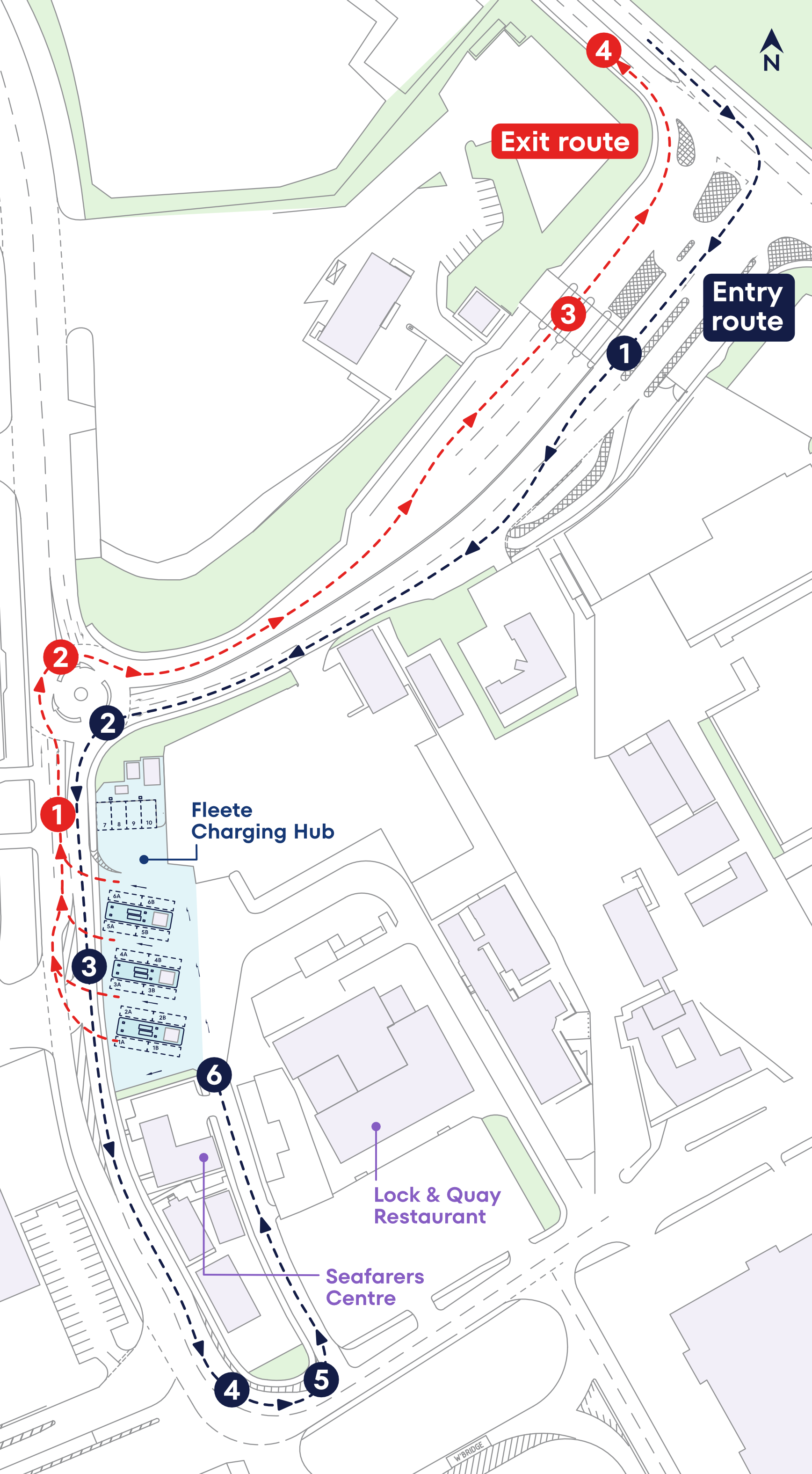
By using the Tilbury Charging Hub, you are confirming that you have read, understood and will comply with specific site rules.
View Tilbury Site Rules →Fleete Hubs are strategically located, high-capacity charging facilities designed to meet the demanding needs of large fleets. Whether at ports, logistics hubs, or distribution centres, our hubs ensure reliable, ultra-fast charging for fleets on the move.
You can learn more about Fleete charging hubs on our website, where we share details about our hub model, technology, and approach to fleet electrification. Visit the Our Solutions section to explore how our hubs support commercial vehicles and heavy-duty fleets.
Yes. We publish dedicated pages for individual hubs as they are launched, including flagship projects such as the Port of Tilbury charging hub. These pages include location details, capabilities, and updates as hubs become operational.
Access to Fleete hubs is designed to be simple for fleet operators. Availability and access arrangements vary by location, but typically fleets register their interest and are onboarded by the Fleete team. For more information, please contact us via the details on our website.
Yes. Fleete hubs operate on a membership or contractual access basis to ensure reliability, availability, and fair use for fleet customers. This approach allows us to manage capacity, provide consistent service levels, and support fleets at scale. We are also partnering with eRoaming providers - details to be announced soon.
The Fleete App is available to download from the Apple App Store and Google Play Store. Once downloaded, you can sign in using your Fleete account details to access hub services and manage charging.
Yes. The Fleete App is free to download and use. Charging costs are applied separately, in line with your Fleete membership or commercial agreement.
If you have forgotten your password, click on the Reset Password link on the App homepage and enter your Fleete account email address. You will then receive a verification code via email and can set a new password in the App. If you need further support, please call our Customer Servicer team on +44 (0) 303 003 1084
In the Fleete App select the Booking icon from the menu and choose Book Session. Select the vehicle you wish to charge and the location you wish to visit. Then choose your preferred date, charging duration and time. You can change the Charging Bay to view the charger availability. Once you have found a free slot, select Book Session. You can amend or cancel your session via the App up to 15 minutes before the session start time.
1. Plug in your charging cable
2. Open the Fleete App
3. On the Map, tap the Fleete icon
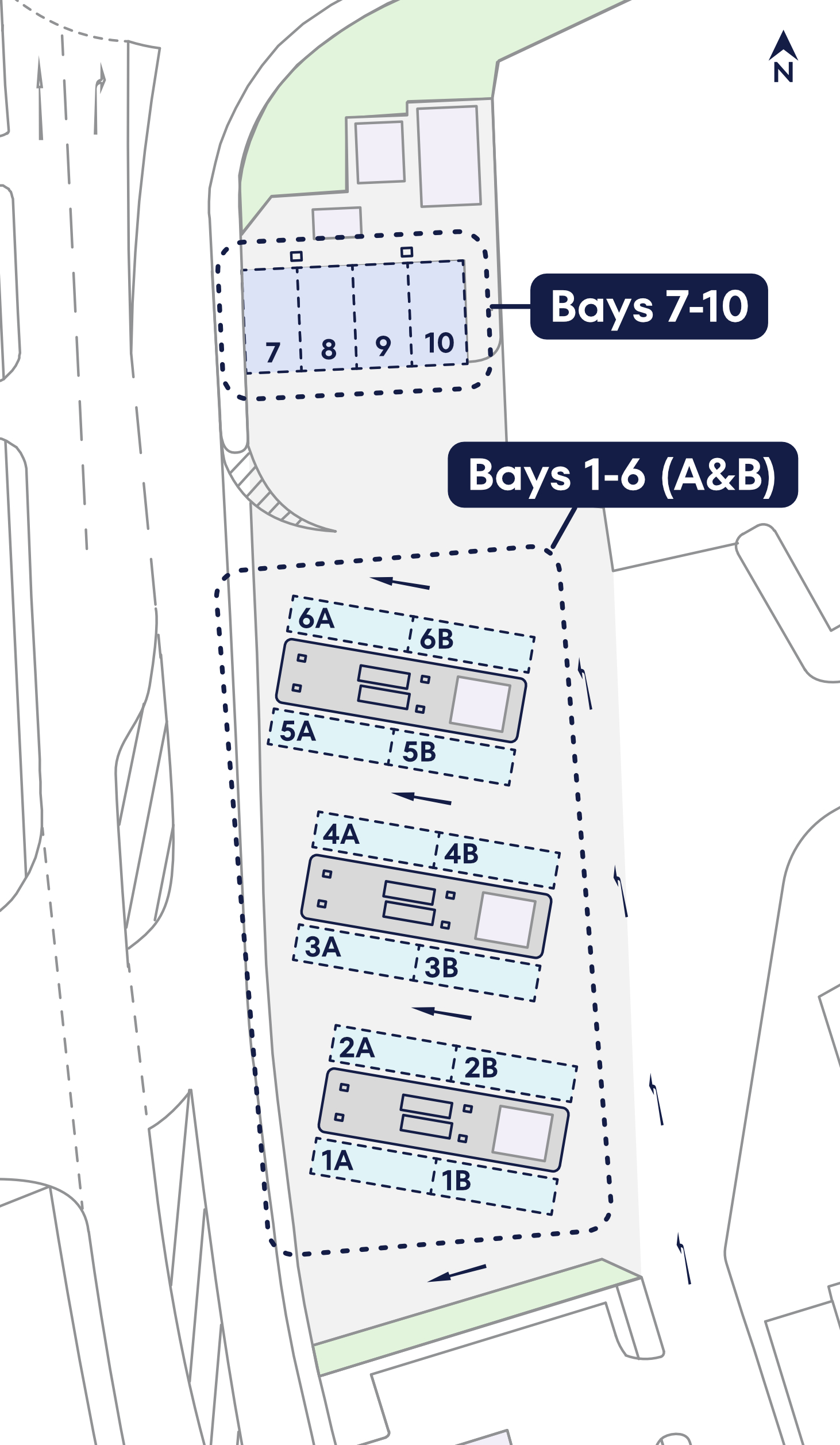
4. Scroll to select your charging bay (charging Bay IDs can be found on the ground and on the side of the charge point)
5. Select your vehicle
6. Select Start Charging
Pricing starts from 0.38p/kWh. Please contact us via the website for more details.
Yes, we strongly recommend that you book in advance to check availability and reserve a charging bay suitable for your vehicle. You can book a charging session via the Fleete App or our Fleete EVO platform.
Booking in advance is strongly recommended to guarantee availability. However, if you arrive at a Fleete charging hub without a booking please check the digital display at the site entrance which will direct you to an available bay. If you are planning to visit a Fleete hub you can book a session via the Fleete App or call our Customer Service team on +44 (0) 303 003 1084 for assistance.
No, there are currently no physically barriers at Fleete charging hubs.
No, due to limited capacity there is currently no parking available at Fleete charging hubs. Please only use the site for charging your vehicle.
Yes, compatible RFID cards can be used to start and stop a charging session at Fleete hubs. Please contact your Fleet Manager for more information.
If you experience any issues whilst at a Fleete charging hub, please contact our 24/7 Customer Service team on +44 (0) 03 003 1084.
In case of emergency please dial 999.
At our Tilbury Charging Hub the power is split between front and rear charging stations on each side of the islands. The first vehicle to plug in will receive 360kWh. If a second vehicle arrives, the second vehicle will initially receive 180kWh, increasing to 360kWh once the first vehicle leaves.
If you are at one of our charging hubs and need support, you can contact our 24/7 Customer Support team on +44 (0) 303 003 1084
If you find a charging station is damaged or not working, please report the issue to our Customer Support team on +44 (0) 303 003 1084
If you have an RFID card, make sure you have plugged the cable in and have tapped the card on the reader below the screen. Alternatively, use the Fleete App and tap on the Fleete icon. Scroll to select your charging bay, select your vehicle and press Start Charging
If you are still having issues, please contact our 24/7 Customer Support team on +44 (0) 303 003 1084
If the cable will not disconnect from your vehicle please check that your vehicle is unlocked. If the cable does not release, try lifting the plug slightly to take the weight and then unlock the vehicle again and it should release.